From a drop-down list, you can select several sentences for creating your reports:

These sentences can be configured from the "Medical Center" settings in the top right-hand corner, then "Report settings" or via this link HERE
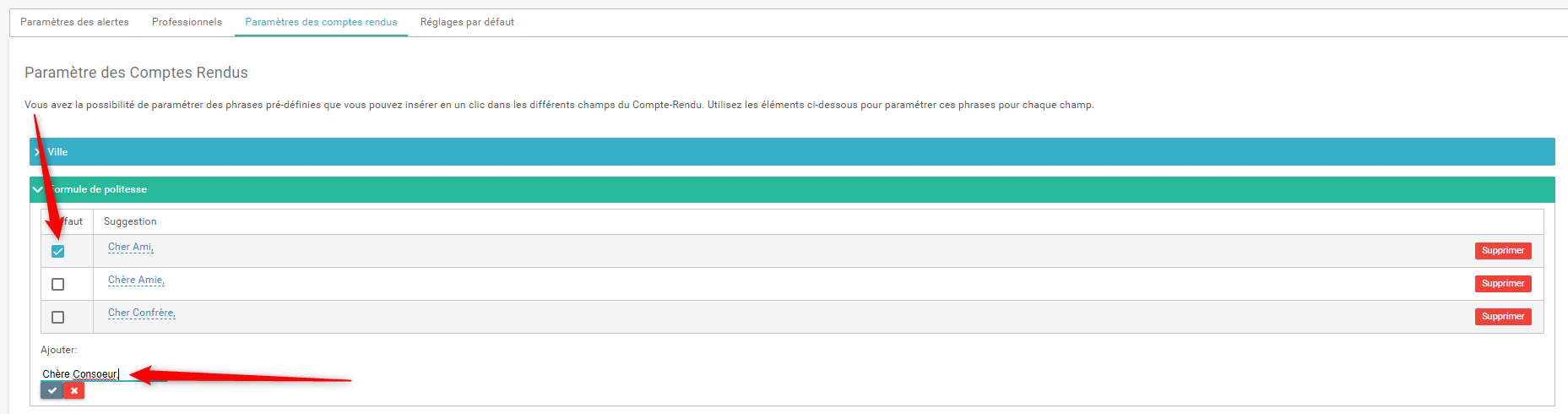
- Click on the drop-down menu to configure the desired message
- Write the sentence to be added in the text field, then validate
- To find this default phrase directly in the report, tick the box to the left of the newly created text.
We propose a set of sentences in the document below. If you want that we set up the sentences for you, please fill in the document by ticking the boxes that interest you and send it back to customer-success@implicity.fr