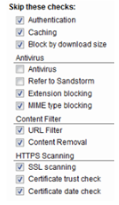
Our partner Crisp uses WebSocket for the chat and HSTS for secure the communication. It may possible that your proxy or your firewall do not support this protocol and stop the access to the chat.
SSL Decoding
Some proxys may not support the WebSocket protocol and stop the smooth functioning of the chat.
If your proxy is active and does SSL decoding, it may possible that the WebSocket can not be established. Currently, the only way to make the chat work correctly is to disable SSL decryption of the proxy.
Firewall blocking access
Our partner Crisp uses HSTS to secure communication. Some firewalls (particularly Fortinet or Fortigate) may replace the certificate and stop the smooth functioning of the chat.
Test access
If the chat does not appear in the bottom right corner of Implicity, make the following test:
- Go on https://client.relay.crisp.chat/
- If everything works correctly, you should see the following content: {"code":0,"message":"No Operation"}
- If you see a SSL error or a security alert, you must whitelist our chat.
Whitelist our chat
Depending on your firewall, different actions are necessary to whitelist our chat.
In general, the domain crisp.chat should be allowed in https and if necessary the listed IPs here.